Org Integration
Oxford English Hub
Org Integration at a glance
Problem: Users enrolled in both Teaching & Learning and Assessment Orgs hit an invisible wall — two separate interfaces, no shared context, no way to navigate seamlessly between them.
Approach: Applied Lean UX methodology — defined the business problem and hypotheses first, then mapped 3 personas, audited the existing role-permission matrix, and designed 4 high-fidelity flows covering every cross-org scenario.
Deliverables: Lean UX canvas, 3 persona maps, full role matrix audit, and 4 design prototypes — student unified view, cross-org wizard, mother-child org hierarchy, and multi-org management.
Status: Discovery complete. Designs handed off for stakeholder validation and engineering sprint planning.
Two products. One user. Zero continuity.
Oxford English Hub operates two parallel worlds: a Teaching & Learning platform where teachers run courses and track class progress, and an Assessment Organisation where students take placement tests like OPT (Oxford Placement Test). For thousands of cross-enrolled users — students in both, teachers managing both, admins overseeing both — this separation was invisible but brutal. Switching context meant losing orientation. UI patterns clashed. The same student appeared as a different entity in each system. The platform felt broken, even when it technically wasn't. The brief was clear: design a seamless, unified cross-org experience without rebuilding either platform.
6-week discovery sprint
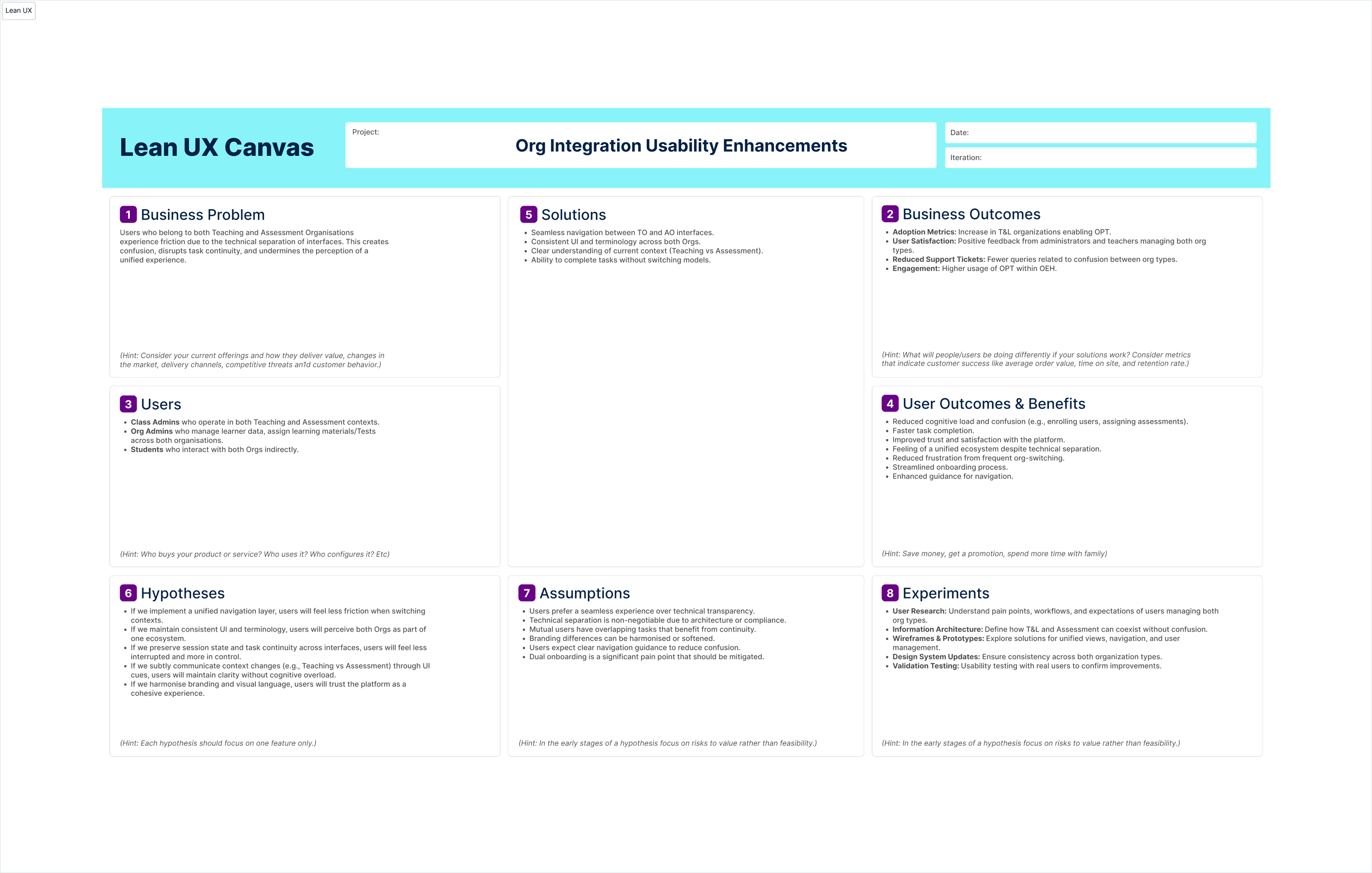
Starting with a Lean UX Canvas — not a brief
Rather than jumping straight to wireframes, I anchored the project in a Lean UX Canvas. The canvas forced the team to articulate the business problem precisely, surface our assumptions, define testable hypotheses, and agree on what success looks like — before a single screen was designed. Three measurable outcomes emerged: T&L adoption of OPT (the placement test integration), improved user satisfaction across both platforms, and a reduction in support tickets driven by cross-org confusion. This became the north star for every design decision that followed.
The problem, hypotheses, and success metrics in one view
The canvas made the team accountable to measurable outcomes before design execution began — not just a prettier layout.
Three roles. Three completely different definitions of 'seamless'.
Cross-org friction hits each user type differently. Garcia López, a student, just wants to see all his tasks in one place — he doesn't know or care which organisation they come from. Fernando González, a Digital Learning Coordinator and Org Admin, is overwhelmed juggling admin tasks across two interfaces to manage staff across both platforms. Sophia Hernandez, a Class Admin and teacher, manages multiple classes across org boundaries and has no unified view of her students' progress. Same root cause — interface separation — three entirely different experiences of the pain.
The role matrix revealed why this was genuinely hard
Before designing anything new, I mapped the existing permission and access model across all three roles. The matrix exposed the underlying complexity: students have no visibility into Assessment Orgs unless explicitly invited; Org Admins can only invite staff — not students directly — due to licensing constraints; Class Admins are the bridge, invitable via wizard or My Org Staff. What felt like a UX problem on the surface was actually a deeply entangled permission architecture. The matrix became both a diagnostic tool and a hard design constraint: every new flow had to respect these boundaries while hiding their complexity completely from end users.
Existing role-permission matrix — what each user can and cannot do
Students can only see [My Tasks] in Assessment Orgs.
Have to be invited to join an Assessment Org separately, even if both Orgs are owned by the same admin.
See a different empty-state message depending on the Org type.
See a [My Tasks] container in their Assessment Org dashboard alongside [Last Opened] and [WOTD] in their T&L Org.
Have to click the [Profile] button and toggle between Orgs through a dropdown.
Owned learning materials are present across all Orgs owned by different or the same admin.
Can see all their progress data across all Orgs when logged in to any of them.
Org Admins can only invite staff, not students, due to licensing rules.
Org Admins see a [Sessions] tab on their Assessment Org dashboard instead of [My Classes].
Can see class progress in T&L Orgs, and OPT progress in Assessment Orgs only via My Org > Placement Tests.
Draft, active, upcoming and completed OPT sessions can be viewed after creation in a tab inside [My Org] called [Placement Tests].
Available actions: Continue setup (Draft), View session info (All), Manage session (active/upcoming/completed), Copy joining code (active/upcoming), View progress (active), View results (completed), Download report card (completed).
Can: add students/teachers, import access codes, give a teacher Class Admin role, rename and edit org info, hand off Org Admin role, create classes, add students/teachers/materials to classes, edit class details and remove members.
Class Admins can be invited to an Assessment Org through the Org creation wizard or within My Org > Staff.
See a [Sessions] tab on their Assessment Org dashboard instead of [My Classes].
Can see class progress in T&L Orgs and OPT progress in Assessment Orgs only via My Org > Placement Tests.
Draft, active, upcoming and completed OPT sessions can be viewed after creation in a tab inside [My Org] called [Placement Tests].
Available actions: Continue setup (Draft), View session info (All), Manage session (active/upcoming/completed), Copy joining code (active/upcoming), View progress (active), View results (completed), Download report card (completed).
Can: create classes, add students/teachers/materials to any class, remove members and materials, rename classes and view student progress. Cannot: add teachers to the org, remove members from the org, import access codes, change org info, hand off Org/Class Admin role, or edit student/teacher profiles. Only the Org Admin can do those.
Mapped from the existing platform behaviour across Students, Org Admins, and Class Admins.
OPT data scoping and the rules we had to design around
Each org shows only its own data
Only when student is member of both orgs
Only see results for students in their orgs
System constraints mapped early — OPT data scoping, org membership rules, and cross-org access logic
How an Org Admin's accounts actually connect
One Org Admin can own multiple Teaching & Learning and Assessment orgs — every org sits in its own data scope.
Three navigation models tested across org types
Top-level tabs swap the entire org context.
- +Familiar pattern
- +Clear active state
- −Context loss on switch
- −Hides sibling orgs
A single header control lists every org the user owns.
- +Always reachable
- +Scales to many orgs
- −Extra click to switch
- −Easy to overlook
Sidebar shows the active org plus a quick-switch list.
- +Spatial awareness
- +Switching feels physical
- −Real estate cost
- −Mobile collapse needed
Each model handles cross-org switching differently — we tested all three against the role matrix before committing.
From sticky notes to possible solutions
Students should not feel any change in experience.
Adding a prominent toggle switch — potentially visible on all main screens — can be a seamless way for users to change orgs.
Hero banners can be a great indication of which type of org the user is in.
Homework assignments should sit within [My Tasks], which now lives in Assessment Orgs only. Having it visible across Org types provides easy access and less confusion. It would be more confusing if homework sat within a testing Org, or if there were two different tasks areas with different content.
Change terminology: 'Invited', 'Org → Test', and make it feel more like a test invitation.
Remove [My Classes] and replace it with class badges on each task.
Org Admins should be able to invite students from other Orgs they created, even T&L ones. A filtering tool can be added.
Adding a prominent toggle switch — potentially visible on all main screens — can be a seamless way for users to change orgs.
It would be less confusing with a prominent 'Change Org' button where they can choose from their different orgs created by the same account. Org Admins choose an org; the hero org title and a slight colour change with the Org type in the main menu button act as an indicator of where the user is.
Add a validation message on the orgs list to alert the Org Admin of any needed actions.
Create a Dashboard tab within My Org that includes insights about the current org and quick actions to reduce click count.
Class Admins should be able to invite students from other Classes they created, even T&L ones. A filtering tool can be added.
Adding a prominent toggle switch — potentially visible on all main screens — can be a seamless way for users to change orgs.
Solution ideas mapped per role — kept lightweight so engineering and PM could react fast.
A single design model to connect both org experiences
One persistent control surface across both platforms — same anatomy, different content.
Every screen knows which org you're in and exposes a single, predictable switch.
Permissions resolved at the data layer — UI hides what the role can't touch.
Shared navigation layer + org context awareness + role-aware access — no platform rewrite required.
Four flows to cover every cross-org scenario
With research complete and constraints fully understood, I designed four distinct flows in high fidelity: (1) A cross-org invitation wizard guiding admins through adding students from one org to another. (2) A mother-child org hierarchy model for administrators managing institutional networks. (3) A multi-org management view for power users overseeing multiple organisations simultaneously. (4) A unified student dashboard aggregating tasks and progress across both org types. Each prototype was fully annotated for development handoff — interaction states, edge cases, error paths, and accessibility notes included.
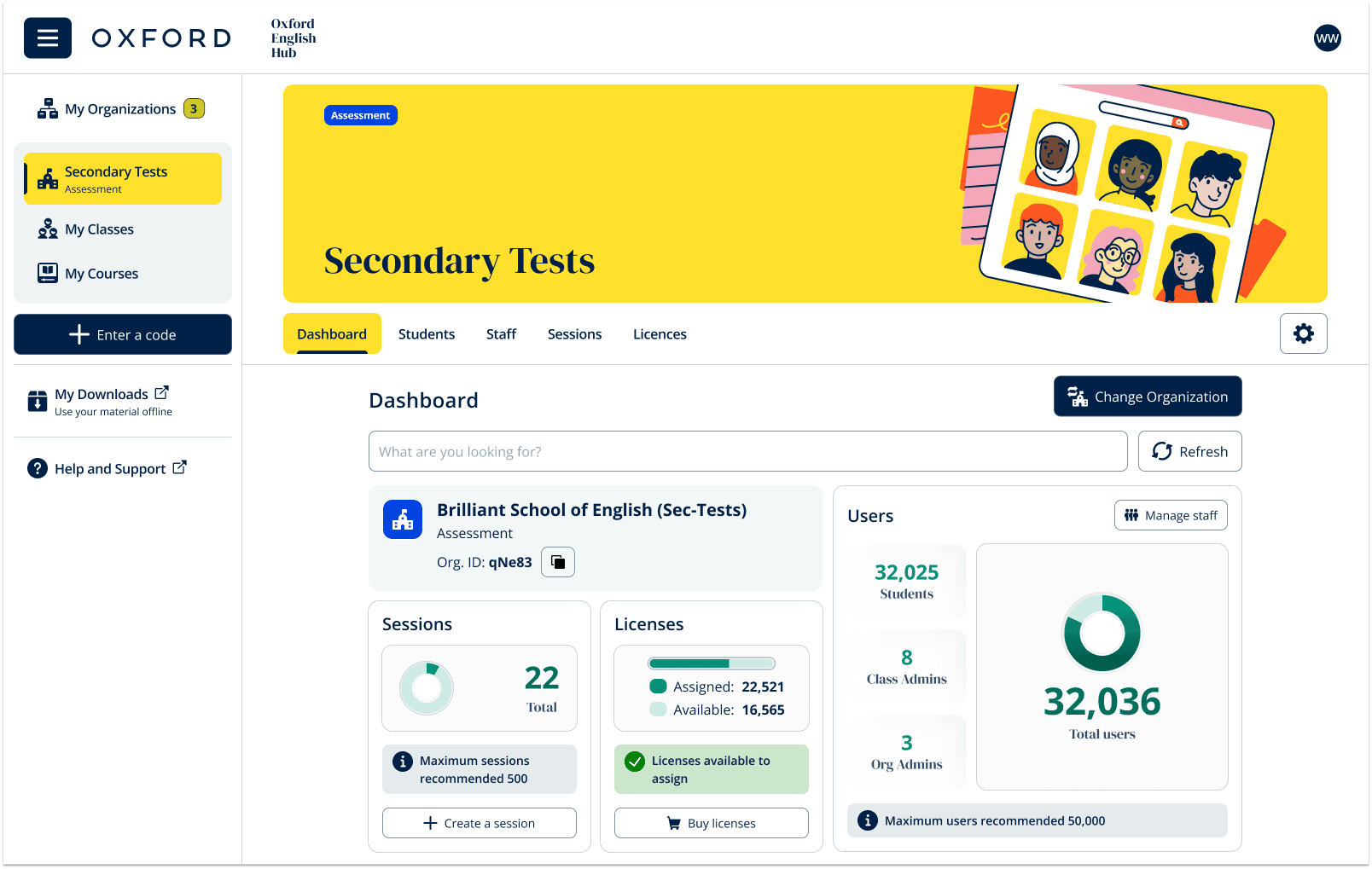
Dashboard, sessions, and placement tests — the Assessment Org experience
The Assessment Org interface centres around session management. Org Admins land on a dashboard showing sessions, licences, and user counts at a glance. From there, they navigate to My Sessions to create and manage Oxford Placement Tests, Oxford Test of English sessions, and future test types. Each session has a detailed management panel with joining codes, scheduling, and student allocation. The 'Change Organisation' button — a key design addition — sits prominently throughout, enabling seamless switching between org contexts.
Assessment vs Teaching & Learning
Assessment Org
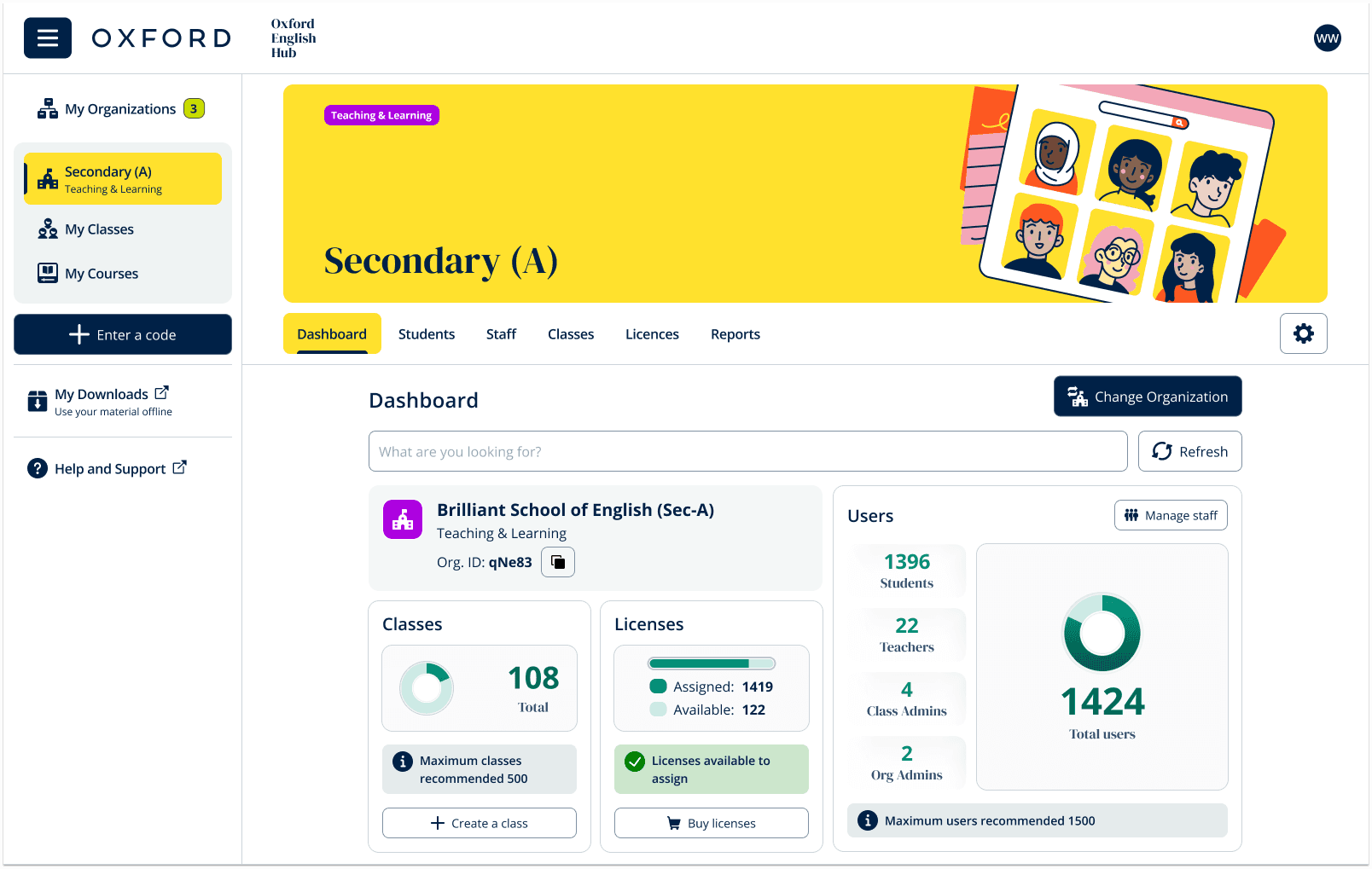
Teaching & Learning Org

From method selection through confirmation — every screen designed with error states, validation, and accessibility in mind.
Managing multiple organisations
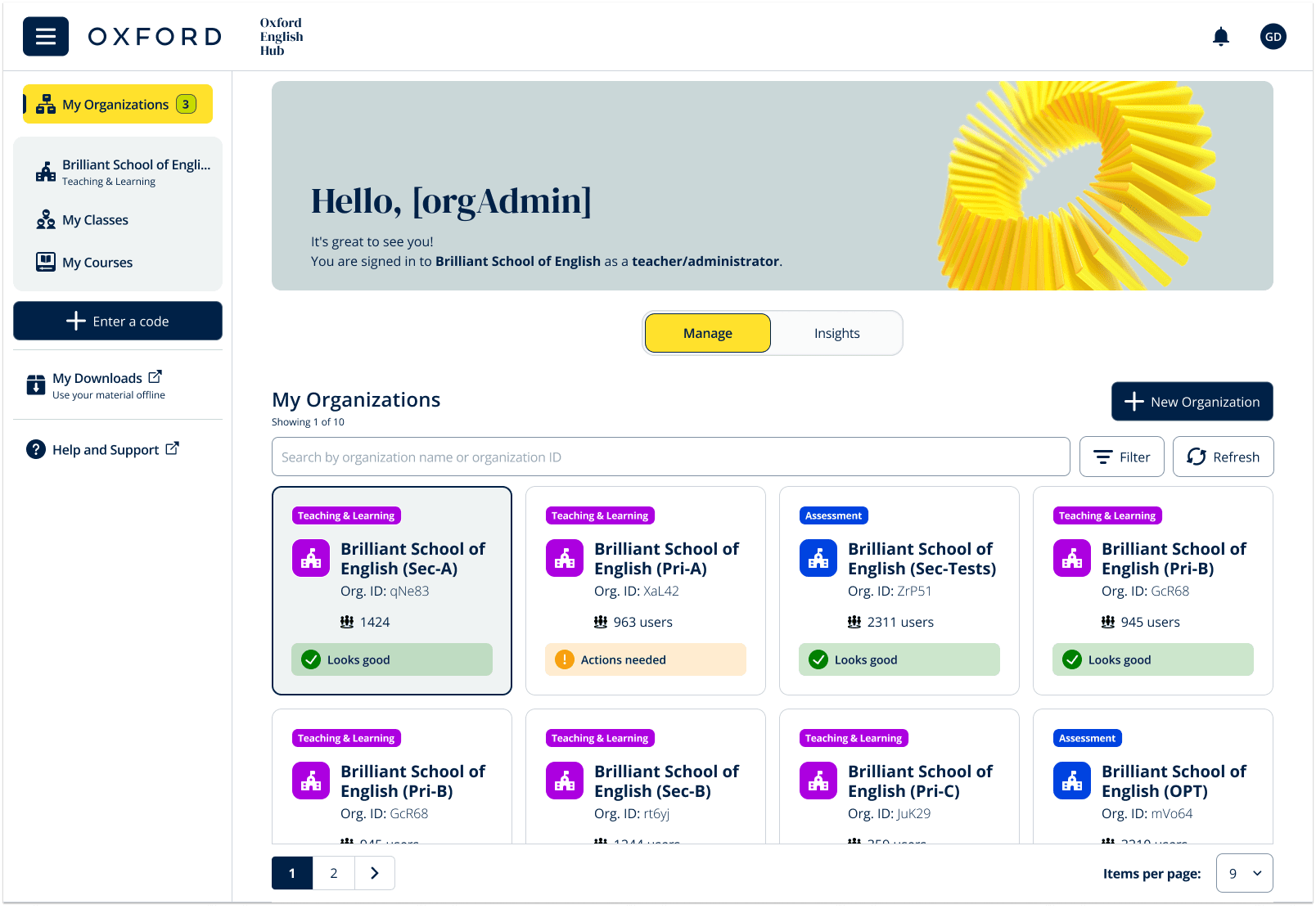
Manage View
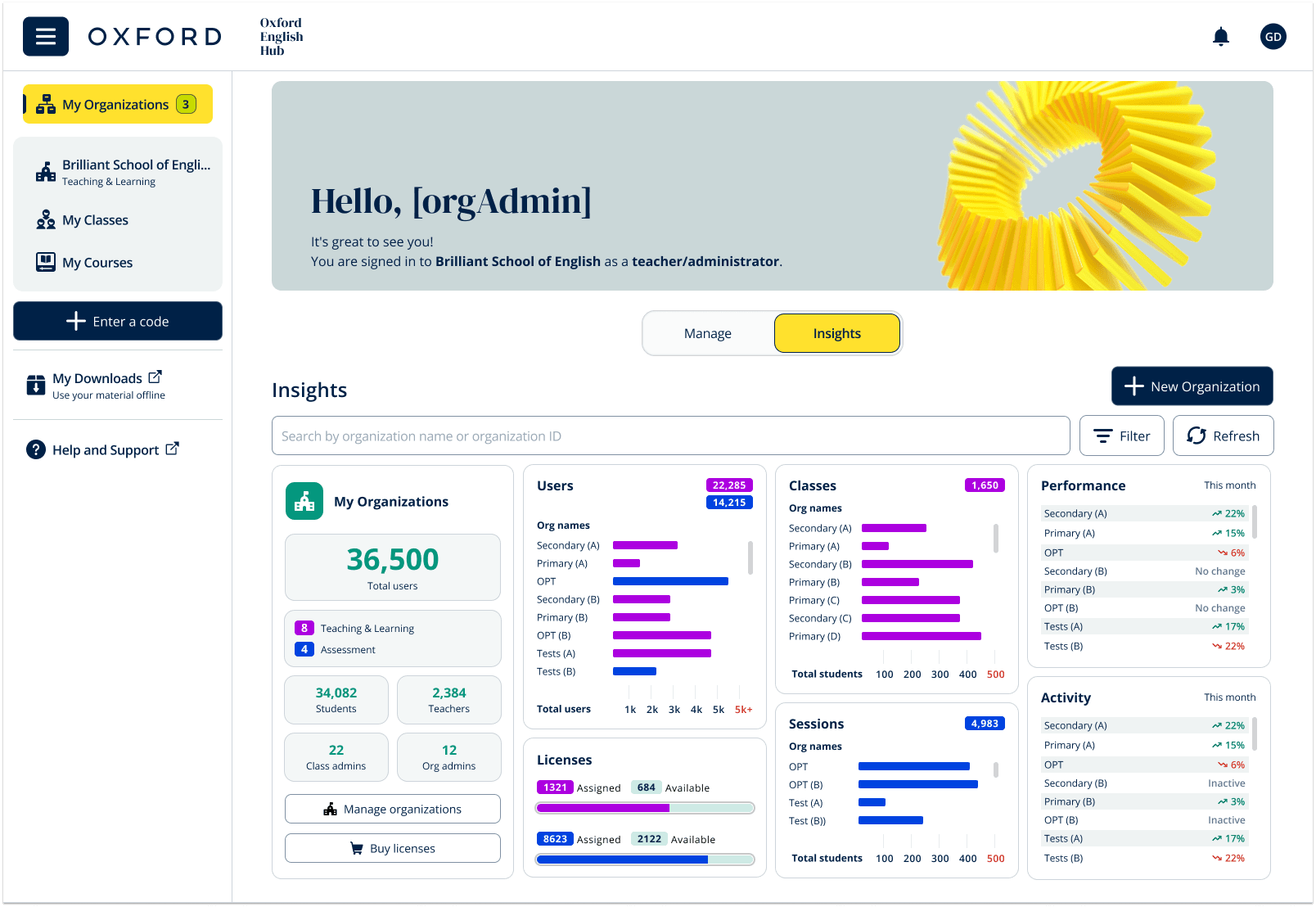
Insights View
Keep the integration feasible and product-led
The highest-impact design decision was to treat the integration as an experience layer rather than a platform rewrite. This meant preserving org-level data isolation, surfacing organisation context clearly, and making every transition reversible. The result was a cleaner product narrative that engineering could validate quickly.
“The goal was never to add features. It was to make two separate ecosystems feel like one — without rebuilding either of them.”
Design principle, Org Integration Discovery
What discovery-first design taught me about enterprise complexity
This project reinforced something I've come to believe deeply: in enterprise software, the hardest problems aren't visible on the surface. The cross-org friction users experienced wasn't a UI bug — it was an architectural assumption that had quietly calcified into a user experience problem. Starting with a Lean UX Canvas instead of jumping to a brief forced the whole team to confront that reality early. The role matrix exercise was equally valuable — it turned abstract permission logic into something concrete and designable. If I were to do this again, I'd push harder to get real users involved in validating the matrix assumptions rather than relying solely on stakeholder sessions. The designs are strong — but they're only as good as the hypotheses underneath them, and those hypotheses deserve user testing before any code is written.